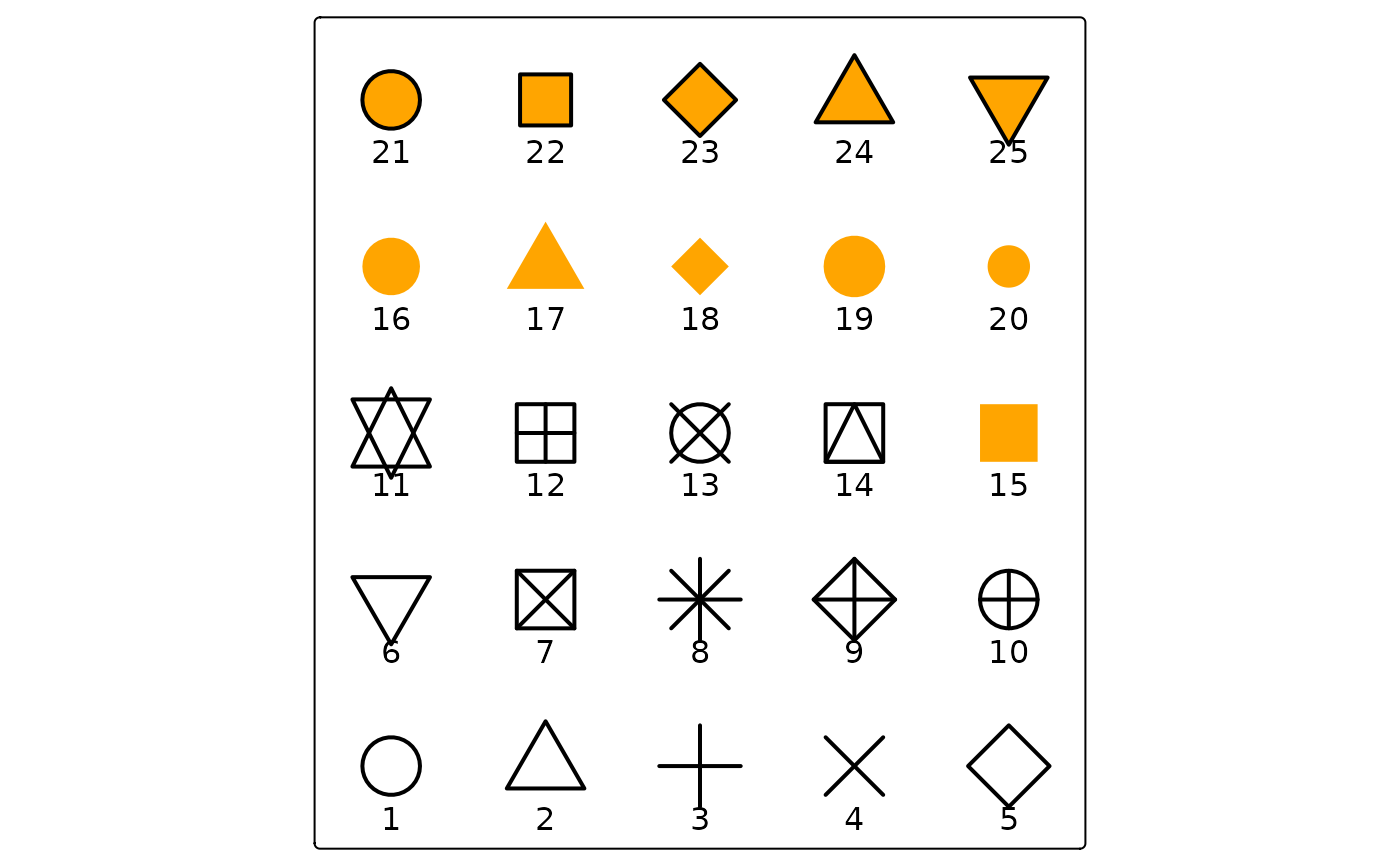
Map layer that draws symbols Supported map variables are:
fill (the fill color), col (the border color), size the symbol size,
shape the symbol shape, lwd (line width), lty (line type), fill_alpha
(fill color alpha transparency) and col_alpha (border color alpha transparency).
Usage
tm_symbols(
  size = tm_const(),
  size.scale = tm_scale(),
  size.legend = tm_legend(),
  size.chart = tm_chart_none(),
  size.free = NA,
  fill = tm_const(),
  fill.scale = tm_scale(),
  fill.legend = tm_legend(),
  fill.chart = tm_chart_none(),
  fill.free = NA,
  col = tm_const(),
  col.scale = tm_scale(),
  col.legend = tm_legend(),
  col.chart = tm_chart_none(),
  col.free = NA,
  shape = tm_const(),
  shape.scale = tm_scale(),
  shape.legend = tm_legend(),
  shape.chart = tm_chart_none(),
  shape.free = NA,
  lwd = tm_const(),
  lwd.scale = tm_scale(),
  lwd.legend = tm_legend(),
  lwd.chart = tm_chart_none(),
  lwd.free = NA,
  lty = tm_const(),
  lty.scale = tm_scale(),
  lty.legend = tm_legend(),
  lty.chart = tm_chart_none(),
  lty.free = NA,
  fill_alpha = tm_const(),
  fill_alpha.scale = tm_scale(),
  fill_alpha.legend = tm_legend(),
  fill_alpha.chart = tm_chart_none(),
  fill_alpha.free = NA,
  col_alpha = tm_const(),
  col_alpha.scale = tm_scale(),
  col_alpha.legend = tm_legend(),
  col_alpha.chart = tm_chart_none(),
  col_alpha.free = NA,
  plot.order = tm_plot_order("size"),
  zindex = NA,
  group = NA,
  group.control = "check",
  popup = tm_popup(),
  popup.vars = NA,
  popup.format = tm_label_format(),
  hover = NA,
  id = "",
  blend = "over",
  options = opt_tm_symbols(),
  ...
)

tm_dots(
  fill = tm_const(),
  fill.scale = tm_scale(),
  fill.legend = tm_legend(),
  fill.free = NA,
  size = tm_const(),
  size.scale = tm_scale(),
  size.legend = tm_legend(),
  size.free = NA,
  lwd = tm_const(),
  lwd.scale = tm_scale(),
  lwd.legend = tm_legend(),
  lwd.free = NA,
  lty = tm_const(),
  lty.scale = tm_scale(),
  lty.legend = tm_legend(),
  lty.free = NA,
  fill_alpha = tm_const(),
  fill_alpha.scale = tm_scale(),
  fill_alpha.legend = tm_legend(),
  fill_alpha.free = NA,
  plot.order = tm_plot_order("DATA"),
  zindex = NA,
  group = NA,
  group.control = "check",
  options = opt_tm_dots(),
  ...
)

tm_bubbles(
  size = tm_const(),
  size.scale = tm_scale(),
  size.legend = tm_legend(),
  size.free = NA,
  fill = tm_const(),
  fill.scale = tm_scale(),
  fill.legend = tm_legend(),
  fill.free = NA,
  col = tm_const(),
  col.scale = tm_scale(),
  col.legend = tm_legend(),
  col.free = NA,
  lwd = tm_const(),
  lwd.scale = tm_scale(),
  lwd.legend = tm_legend(),
  lwd.free = NA,
  lty = tm_const(),
  lty.scale = tm_scale(),
  lty.legend = tm_legend(),
  lty.free = NA,
  fill_alpha = tm_const(),
  fill_alpha.scale = tm_scale(),
  fill_alpha.legend = tm_legend(),
  fill_alpha.free = NA,
  col_alpha = tm_const(),
  col_alpha.scale = tm_scale(),
  col_alpha.legend = tm_legend(),
  col_alpha.free = NA,
  plot.order = tm_plot_order("size"),
  zindex = NA,
  group = NA,
  group.control = "check",
  options = opt_tm_bubbles(),
  ...
)

tm_squares(
  size = tm_const(),
  size.scale = tm_scale(),
  size.legend = tm_legend(),
  size.free = NA,
  fill = tm_const(),
  fill.scale = tm_scale(),
  fill.legend = tm_legend(),
  fill.free = NA,
  col = tm_const(),
  col.scale = tm_scale(),
  col.legend = tm_legend(),
  col.free = NA,
  lwd = tm_const(),
  lwd.scale = tm_scale(),
  lwd.legend = tm_legend(),
  lwd.free = NA,
  lty = tm_const(),
  lty.scale = tm_scale(),
  lty.legend = tm_legend(),
  lty.free = NA,
  fill_alpha = tm_const(),
  fill_alpha.scale = tm_scale(),
  fill_alpha.legend = tm_legend(),
  fill_alpha.free = NA,
  col_alpha = tm_const(),
  col_alpha.scale = tm_scale(),
  col_alpha.legend = tm_legend(),
  col_alpha.free = NA,
  plot.order = tm_plot_order("size"),
  zindex = NA,
  group = NA,
  group.control = "check",
  options = opt_tm_squares(),
  ...
)

tm_markers(
  text = tm_const(),
  text.scale = tm_scale(),
  text.legend = tm_legend(),
  text.chart = tm_chart_none(),
  text.free = NA,
  size = tm_const(),
  size.scale = tm_scale(),
  size.legend = tm_legend(),
  size.chart = tm_chart_none(),
  size.free = NA,
  col = tm_const(),
  col.scale = tm_scale(),
  col.legend = tm_legend(),
  col.chart = tm_chart_none(),
  col.free = NA,
  col_alpha = tm_const(),
  col_alpha.scale = tm_scale(),
  col_alpha.legend = tm_legend(),
  col_alpha.chart = tm_chart_none(),
  col_alpha.free = NA,
  fontface = tm_const(),
  fontface.scale = tm_scale(),
  fontface.legend = tm_legend(),
  fontface.chart = tm_chart_none(),
  fontface.free = NA,
  fontfamily = "",
  bgcol = tm_const(),
  bgcol.scale = tm_scale(),
  bgcol.legend = tm_legend(),
  bgcol.chart = tm_chart_none(),
  bgcol.free = NA,
  bgcol_alpha = tm_const(),
  bgcol_alpha.scale = tm_scale(),
  bgcol_alpha.legend = tm_legend(),
  bgcol_alpha.chart = tm_chart_none(),
  bgcol_alpha.free = NA,
  xmod = 0,
  xmod.scale = tm_scale(),
  xmod.legend = tm_legend_hide(),
  xmod.chart = tm_chart_none(),
  xmod.free = NA,
  ymod = 0,
  ymod.scale = tm_scale(),
  ymod.legend = tm_legend_hide(),
  ymod.chart = tm_chart_none(),
  ymod.free = NA,
  angle = 0,
  angle.scale = tm_scale(),
  angle.legend = tm_legend_hide(),
  angle.chart = tm_chart_none(),
  angle.free = NA,
  plot.order = tm_plot_order("AREA", reverse = FALSE, na.order = "bottom"),
  zindex = NA,
  group = NA,
  group.control = "check",
  options = opt_tm_markers(),
  ...
)

opt_tm_markers(
  markers_on_top_of_text = FALSE,
  points_only = "ifany",
  point_per = "feature",
  on_surface = FALSE,
  shadow = FALSE,
  shadow.offset.x = 0.1,
  shadow.offset.y = 0.1,
  just = "center",
  along_lines = TRUE,
  bg.padding = 0.4,
  clustering = TRUE,
  point.label = TRUE,
  point.label.gap = 0.4,
  point.label.method = "SANN",
  remove_overlap = FALSE,
  dots.just = NA,
  dots.icon.scale = 3,
  dots.grob.dim = c(width = 48, height = 48, render.width = 256, render.height = 256)
)

opt_tm_symbols(
  points_only = "ifany",
  point_per = "feature",
  on_surface = FALSE,
  clustering = FALSE,
  icon.scale = 3,
  just = NA,
  hitbox = "auto",
  grob.dim = c(width = 48, height = 48, render.width = 256, render.height = 256)
)

opt_tm_dots(
  points_only = "ifany",
  point_per = "feature",
  on_surface = FALSE,
  clustering = FALSE,
  icon.scale = 3,
  just = NA,
  hitbox = "auto",
  grob.dim = c(width = 48, height = 48, render.width = 256, render.height = 256)
)

opt_tm_bubbles(
  points_only = "ifany",
  point_per = "feature",
  on_surface = FALSE,
  clustering = FALSE,
  icon.scale = 3,
  just = NA,
  hitbox = "auto",
  grob.dim = c(width = 48, height = 48, render.width = 256, render.height = 256)
)

opt_tm_squares(
  points_only = "ifany",
  point_per = "feature",
  on_surface = FALSE,
  clustering = FALSE,
  icon.scale = 3,
  just = NA,
  hitbox = "auto",
  grob.dim = c(width = 48, height = 48, render.width = 256, render.height = 256)
)
Arguments
- size, size.scale, size.legend, size.chart, size.free
Map variable that determines the size. See details. Unit: Typographic lines ("lines"); 1 line is approx. 1/6 inch. Controlled by
values.scaleandtmap_options(values.scale = ...).- fill, fill.scale, fill.legend, fill.chart, fill.free
Map variable that determines the fill color. See details. Unit: Color – a color name, hex string.
- col, col.scale, col.legend, col.chart, col.free
Map variable that determines the color. See details. Unit: Color – a color name, hex string.
- shape, shape.scale, shape.legend, shape.chart, shape.free
Map variable that determines the shape. See details. Unit: Integer
pchcode (1-25) used as a plotting symbol. See example oftm_symbols()- lwd, lwd.scale, lwd.legend, lwd.chart, lwd.free
Map variable that determines the line width. See details. Unit: Base R line-width units; 1 lwd is approx. 0.75 pt at 96 dpi.
- lty, lty.scale, lty.legend, lty.chart, lty.free
Map variable that determines the line type. See details. Unit: Integer (1-6) or name: "solid", "dashed", "dotted", "dotdash", "longdash", "twodash".
- fill_alpha, fill_alpha.scale, fill_alpha.legend, fill_alpha.chart, fill_alpha.free
Map variable that determines the fill color transparency. See details. Unit: Proportion – numeric 0-1 (0 = fully transparent, 1 = fully opaque). the fill color alpha transparency See details.
- col_alpha, col_alpha.scale, col_alpha.legend, col_alpha.chart, col_alpha.free
Map variable that determines the color transparency. See details. Unit: Proportion – numeric 0-1 (0 = fully transparent, 1 = fully opaque).
- plot.order
Specification in which order the spatial features are drawn. See
tm_plot_order()for details.- zindex
Controls the stacking order of map layers. Should be set to a value above 400. By default, layers are stacked in call order, starting at 401. See details.
- group
Name of the group to which this layer belongs. This is only relevant in view mode, where layer groups can be switched (see
group.control)- group.control
In view mode, the group control determines how layer groups can be switched on and off. Options:
"radio"for radio buttons (meaning only one group can be shown),"check"for check boxes (so multiple groups can be shown), and"none"for no control (the group cannot be (de)selected).- popup
popup specification for
"view"mode, the output oftm_popup(). It determines the data variables shown in the popup table, the popup title, and (in the future) the popup layout. This replaces the deprecated argumentspopup.varsandpopup.format.- popup.vars
(Deprecated.) Use
popupwithtm_popup()instead (via itsvarsargument). Names of data variables that are shown in the popups in"view"mode. Setpopup.varstoTRUEto show all variables in the shape object. Setpopup.varstoFALSEto disable popups. Setpopup.varsto a character vector of variable names to show those variables in the popups. The default (NA) depends on whether visual variables (e.g.fill) are used. If so, only those are shown. If not, all variables in the shape object are shown.- popup.format
(Deprecated.) Use
popupwithtm_popup()instead (via itsformatargument). List of formatting options for the popup values. Output oftm_label_format(). Only applicable for numeric data variables. If one list of formatting options is provided, it is applied to all numeric variables ofpopup.vars. Also, a (named) list of lists can be provided. In that case, each list of formatting options is applied to the named variable.- hover
name of the data variable that specifies the hover labels (view mode only). Set to
FALSEto disable hover labels. By defaultFALSE, unlessidis specified. In that case, it is set toid,- id
name of the data variable that specifies the indices of the spatial features. Only used for
"view"mode.- blend
Compositing operator for layer blending. Default
"over"applies no blending. See the "Layer blending" section for the supported values.- options
options passed on to the corresponding
opt_<layer_function>function- ...
to catch deprecated arguments from version < 4.0
- text, text.scale, text.legend, text.chart, text.free
Map variable that determines the text. See details. Unit: Character string.
- fontface, fontface.scale, fontface.legend, fontface.chart, fontface.free
Map variable that determines the font face. See details. Unit: "plain", "bold", "italic", or "bold.italic".
- fontfamily
The font family. See gpar() for details.
- bgcol, bgcol.scale, bgcol.legend, bgcol.chart, bgcol.free
Map variable that determines the background color. See Details. Unit: Color – a color name, hex string.
- bgcol_alpha, bgcol_alpha.scale, bgcol_alpha.legend, bgcol_alpha.chart, bgcol_alpha.free
Map variable that determines the background color transparency. See Details. Unit: Proportion – numeric 0-1 (0 = fully transparent, 1 = fully opaque).
- xmod, xmod.scale, xmod.legend, xmod.chart, xmod.free
Transformation variable that determines the x offset. See details. Unit: Line heights, relative to the label anchor. Positive = right.
- ymod, ymod.scale, ymod.legend, ymod.chart, ymod.free
Transformation variable that determines the y offset. See details. Unit: Line heights, relative to the label anchor. Positive = up. the text. See details.
- angle, angle.scale, angle.legend, angle.chart, angle.free
Rotation angle Unit: Degrees, clockwise from north (0-360).
- markers_on_top_of_text
should markers be plot on top of the text (by default
FALSE)- points_only
should only point geometries of the shape object (defined in
tm_shape()) be plotted? By default"ifany", which meansTRUEin case a geometry collection is specified.- point_per
specification of how spatial points are mapped when the geometry is a multi line or a multi polygon. One of
"feature","segment"or"largest". The first generates a spatial point for every feature, the second for every segment (i.e. subfeature), the third only for the largest segment (subfeature). Note that the last two options can be significant slower.- on_surface
In case of polygons, centroids are computed. Should the points be on the surface? If
TRUE, which is slower than the defaultFALSE, centroids outside the surface are replaced with points computed withsf::st_point_on_surface().- shadow
Shadow behind the text. Logical.
- shadow.offset.x, shadow.offset.y
Shadow offset in line heights
- just
justification of the text relative to the point coordinates. Either one of the following values:
"left","right","center","bottom", and"top", or a vector of two values where first value specifies horizontal and the second value vertical justification. Besides the mentioned values, also numeric values between 0 and 1 can be used. 0 means left justification for the first value and bottom justification for the second value. Note that in view mode, only one value is used.- along_lines
logical that determines whether labels are rotated along the spatial lines. Only applicable if a spatial lines shape is used.
- bg.padding
The padding of the background in terms of line heights.
- clustering
in interactive modes (e.g.
"view"mode), should clustering be applied at lower zoom levels? EitherFALSE(default),TRUE, or a mode specific specification, e.g. for"view"modemarkerClusterOptions.- point.label
logical that determines whether the labels are placed automatically. By default
FALSEfortm_text, andTRUEfortm_labelsif the number of labels is less than 500 (otherwise it will be too slow).- point.label.gap
numeric that determines the gap between the point and label
- point.label.method
the optimization method, either
"SANN"for simulated annealing (the default) or"GA"for a genetic algorithm.- remove_overlap
logical that determines whether the overlapping labels are removed
- dots.just
justification of the text relative to the point coordinates. Either one of the following values:
"left","right","center","bottom", and"top", or a vector of two values where first value specifies horizontal and the second value vertical justification. Besides the mentioned values, also numeric values between 0 and 1 can be used. 0 means left justification for the first value and bottom justification for the second value. Note that in view mode, only one value is used.- dots.icon.scale
scaling number that determines how large the icons (or grobs) are in plot mode in comparison to proportional symbols (such as bubbles). In view mode, the size is determined by the icon specification (see
tmap_icons) or, if grobs are specified bygrob.widthandgrob.height- dots.grob.dim
vector of four values that determine how grob objects (see details) are shown in view mode. The first and second value are the width and height of the displayed icon. The third and fourth value are the width and height of the rendered png image that is used for the icon. Generally, the third and fourth value should be large enough to render a ggplot2 graphic successfully. Only needed for the view mode.
- icon.scale
scaling number that determines how large the icons (or grobs) are in plot mode in comparison to proportional symbols (such as bubbles). For view mode, use the argument
grob.dim- hitbox
Controls whether an invisible interaction layer with a larger clickable area (\"hitbox\") is added on top of the symbols.
This can improve click and popup behavior for small or densely packed symbols by enlarging the effective mouse interaction area.
Possible values:
- "none"
No additional hitbox layer is added. Symbols are clickable only at their visible size.
html
\item{"plusX"}{Adds \code{X} pixels to the visible symbol diameter to compute the interaction size. For example, \code{"plus8"} widens the clickable area by 4 pixels around each symbol edge.} \item{"pmaxX"}{Ensures a minimum interaction diameter of \code{X} pixels: \code{pmax(symbol_diameter, X)}. Useful only for very small symbols, as it adds no margin to symbols already larger than \code{X}.} \item{"auto"}{\code{"pmax12"} if and only if interactive features are enabled (popup or hover), symbols are small (median visible diameter < 12px), and there are fewer than 10000 features. Otherwise \code{"none"}.} htmlplusandpmaxcan be combined, e.g."plus4pmax8". The hitbox is not applied when clustering is enabled.- grob.dim
vector of four values that determine how grob objects (see details) are shown in view mode. The first and second value are the width and height of the displayed icon. The third and fourth value are the width and height of the rendered png image that is used for the icon. Generally, the third and fourth value should be large enough to render a ggplot2 graphic successfully. Only needed for the view mode.
Details
A symbol shape specification is one of the following three options.
A numeric value that specifies the plotting character of the symbol. See parameter
pchofpointsand the last example to create a plot with all options. Note that this is not supported for the"view" mode.A
grobobject, which can be a ggplot2 plot object created withggplotGrob. To specify multiple shapes, a list of grob objects is required. Tip: for proportional symbols, such as donuts or pies, see the extension package vignette: tmap.glyphs.An icon specification, which can be created with
tmap_icons().
To specify multiple shapes (needed for the shapes argument), a vector or list of these shape specification is required. The shape specification options can also be mixed. For the shapes argument, it is possible to use a named vector or list, where the names correspond to the value of the variable specified by the shape argument.
For small multiples, a list of these shape specification(s) should be provided.
Examples
########################
## plot symbol shapes
########################

# create grid of 25 points in the Atlantic
atlantic_grid = cbind(expand.grid(x = -51:-47, y = 20:24), id = seq_len(25))
x = sf::st_as_sf(atlantic_grid, coords = c("x", "y"), crs = 4326)

tm_shape(x, bbox = tmaptools::bb(x, ext = 1.2)) +
  tm_symbols(shape = "id",
         size = 2,
         lwd = 2,
         fill = "orange",
         col = "black",
         shape.scale = tm_scale_asis()) +
  tm_text("id", ymod = -2)